

The right Starlink purchase starts with the seller, not just the dish. If you’re comparing starlink hardware for sale, first confirm what the kit includes, whether it suits your installation environment, and how you’ll arrange internet service. Hardware and a monthly service plan are separate purchases.
Those checks matter because kit contents, availability, and compatibility can vary. DLL Networks sells Starlink Standard 4 X, Mini, Performance, and Standard V5 kits, but you should confirm current stock and the exact contents of any kit before ordering. Check the seller’s authorization status, activation requirements, and whether the equipment fits your intended deployment. A roof, pole, home, business, or marine installation may also call for different setup considerations.
This guide explains the main hardware categories and what to verify with a seller before you buy. You’ll learn how to check kit contents, availability, and service eligibility, then assess whether you need installation support. DLL Networks offers hardware deployment and network setup, while Starlink internet service must be arranged separately.
Key Takeaways
- Compare the Starlink kit categories against your deployment needs before choosing equipment.
- When evaluating starlink hardware for sale, confirm the exact model, included components, current stock, and order terms.
- Check that the seller is authorized and confirm service eligibility and plan requirements separately from the hardware purchase.
- Assess mounting, cable routing, power, and Wi-Fi needs for your specific site or vessel before ordering.
- Consider hardware selection and professional installation as separate, complementary steps in preparing your setup.
Starlink Hardware for Sale: What the Purchase Includes, and What It Does Not
Starlink hardware is the physical equipment used to connect to the Starlink network. It is separate from the internet service plan. That distinction matters when comparing starlink hardware for sale: purchasing a kit does not, by itself, establish what service is available at your location or what plan terms apply.
A kit, additional networking equipment, and installation support address different parts of a deployment. The kit is the core equipment category to assess. An additional Wi-Fi system may be relevant to your network setup. Installation and configuration are separate considerations shaped by the site and how you plan to use the equipment. For background on the wider Starlink satellite network, see its history, technology, and services.
Does buying Starlink hardware include internet service?
No. A hardware purchase and an internet service plan are separate considerations. Before ordering, check current Starlink information for service availability at your intended location and the plan terms that apply. DLL Networks sells Starlink hardware and provides professional installation and setup, but it does not sell monthly Starlink service plans. Arrange service separately.
What kinds of Starlink equipment can buyers evaluate?
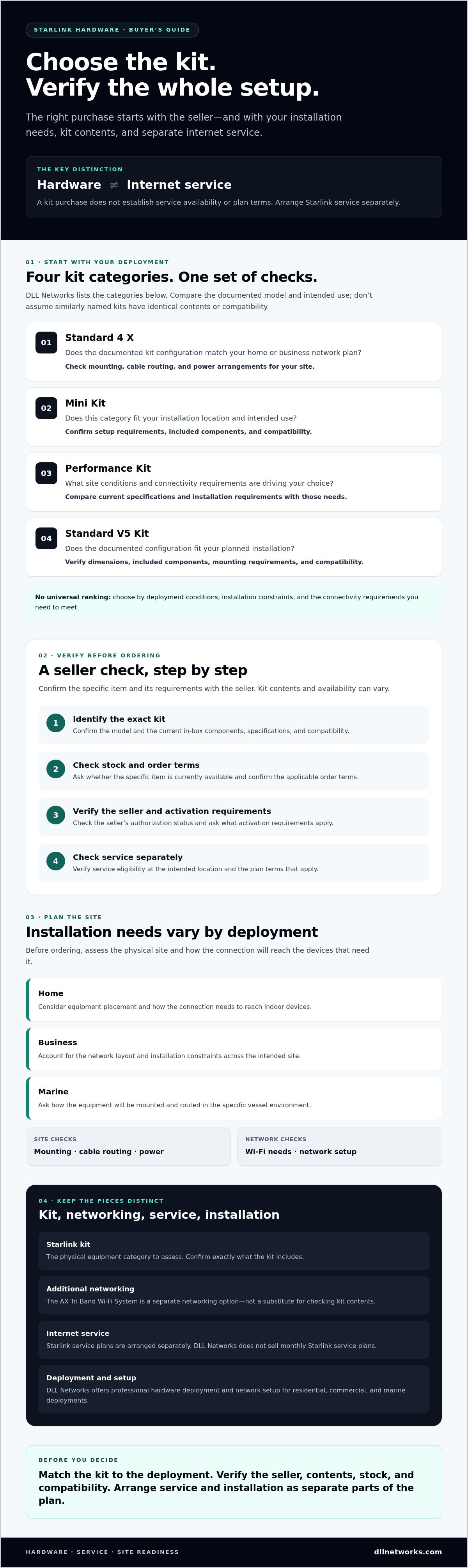
DLL Networks lists four Starlink kit categories: Standard 4 X, Mini Kit, Performance Kit, and Standard V5 Kit. The right one depends on your deployment requirements, so compare the exact model and intended use rather than assuming that similarly named kits have identical contents or compatibility.
The AX Tri Band Wi-Fi System is a separate networking option to consider as part of a broader setup. It is not a substitute for confirming what comes with a Starlink kit. Before ordering, ask the seller to verify the current in-box components, specifications, compatibility, and stock status for the specific item. Contents and availability can change; confirm details against current product information.
Hardware is the equipment; service is the internet plan. Keep both in view, but verify them separately. That helps prevent a mismatch between the kit you purchase, the service available for your deployment, and the equipment needed to complete your network.
DLL Networks offers professional hardware deployment and network setup for residential, commercial, and marine deployments. Treat that support as a distinct installation decision: first identify the kit and additional networking equipment you need, then clarify the setup requirements for your site. The following sections examine how to compare kit categories and what to check with a seller before placing an order.
Compare Starlink Hardware Categories by Deployment Requirement
There’s no useful ranking without knowing where and how the equipment will be used. DLL Networks lists four Starlink kit categories. Compare them by deployment conditions, installation constraints, and the connectivity requirements you need to meet. The questions below are a starting point, not a claim that a particular kit is suitable for a specific environment.
How should buyers assess Standard, Mini, Performance, and Standard V5?
Evaluate each model against the same requirements. For broader background on the satellite network, consult these Starlink satellite facts, then verify terminal specifications using current product documentation.
| Kit category | Questions to ask before choosing |
|---|---|
| Standard 4 X | Does the documented kit configuration match your home or business network plan? What mounting, cable-routing, and power arrangements does your site require? |
| Mini Kit | Do your installation location and use case call for this category? Confirm its documented setup requirements, included components, and compatibility for the intended deployment. |
| Performance Kit | What site conditions and connectivity requirements are driving your selection? Check the current specifications and installation requirements against those needs. |
| Standard V5 Kit | Does its documented configuration fit your planned installation? Verify dimensions, included components, mounting requirements, and compatibility before ordering. |
For a home, consider where equipment can be installed and how the connection needs to reach indoor devices. A business buyer may need to account for the network layout and installation constraints across the intended site. For a vessel, ask how the equipment will be mounted and routed in that specific environment. These are assessment prompts, not assurances of model suitability.
For every category, confirm the exact model name, current specifications, included components, compatibility, and availability before purchase. Names alone don’t establish which kit configuration meets your requirements.
When might additional Wi-Fi hardware be relevant?
The Starlink terminal connection and Wi-Fi coverage inside a building or vessel are separate system considerations. If you’re comparing starlink hardware for sale, assess the terminal kit and the local network requirements independently. DLL Networks also lists the AX Tri Band Wi-Fi System. Before considering it, ask whether it’s compatible with your selected configuration, whether its coverage suits the space, and what network setup it supports.
Use your installation plan to guide the comparison, then confirm model details and stock with the seller. If you need help assessing equipment and setup together, review Starlink hardware options from DLL Networks.
How to Verify a Starlink Hardware Seller Before You Order
A clear listing is a starting point, not a complete order check. Before buying starlink hardware for sale, match the item to your deployment plan and get the important details confirmed in writing. This reduces the risk of ordering a different model, missing required equipment, or assuming support is included when it isn’t.
Use this sequence before committing:
- Match the product name on the order to the kit category you intend to buy.
- Request written confirmation of the exact contents and current stock status.
- Review shipping terms, return conditions, and any other order terms directly with the seller.
- Check whether your mounting, cabling, or networking plan requires equipment beyond the kit.
- Clarify who handles installation, network setup, and questions after purchase.
Which product and order details should you confirm?
Start with the model name. Check that the order specifies the intended kit, such as Standard 4 X, Mini Kit, Performance Kit, or Standard V5 Kit. If you’re comparing models, a guide to Starlink kits can provide additional context, but confirm the current specifications and package contents against product documentation before ordering.
Ask the seller to confirm stock, included components, shipping terms, and return conditions in writing. Then describe your installation plan and ask whether any separate mount, cable, or networking equipment is required. Don’t assume an accessory is included, or necessary, based on a general product description.
What support should buyers ask about before purchase?
Equipment selection and physical installation are separate questions. Ask whether the seller can guide you through choosing equipment for your site and whether professional installation is available. If configuration is needed, confirm who performs it and what the quoted scope covers, including any limits or separately required equipment.
DLL Networks sells Starlink hardware and provides professional network installation and setup. Clarify which parts of your deployment that support covers. Keep seller assistance separate from Starlink service-plan questions: confirm service availability and plan terms through current Starlink information, and determine separately who handles service billing and account support.
A reliable order decision rests on specific confirmations, not assumptions. Before you proceed, make sure the model, kit contents, stock status, order terms, installation responsibilities, and service arrangements are all clear.
Prepare Your Starlink Hardware Purchase for Installation
Installation conditions can affect which kit and supporting equipment make sense. Before ordering starlink hardware for sale, assess the site and intended network layout. A house, commercial building, and vessel can each present different mounting, cable-routing, power, and coverage questions. Confirm model-specific requirements using current product documentation rather than assuming one setup fits every deployment.
What should you assess at the installation site?
Start with the proposed mounting location. Identify potential obstructions and consider whether the position is practical for installation and ongoing access. Then map the cable route from the equipment location to the indoor network area, noting any obstacles or routing constraints.
Use this checklist to prepare questions for the seller or installer:
- Mounting: Where can the equipment be positioned, and what mounting approach does the selected kit support?
- Obstructions: Could nearby structures or objects affect the proposed location?
- Cable routing: What path will connect the equipment to the intended indoor location, and is any additional cabling needed?
- Power: What power arrangements does the exact kit require, and are they available at the planned equipment location?
- Wi-Fi: Where do users need network coverage, and will the planned router setup reach those areas?
For marine installations, verify environmental, mounting, routing, and power requirements for the specific kit and vessel. Don’t infer marine suitability from a product name or general description. The vessel and installation plan can change what equipment and setup are appropriate.
When does professional setup make sense?
Professional assistance may be useful when the installation involves complex mounting, a challenging cable route, or networking across multiple devices or areas. It isn’t necessary for every buyer. The decision depends on the site, your installation plan, and your ability to complete the work to the manufacturer’s requirements.
Before arranging setup, ask the installer to define the scope. Confirm what configuration is included, whether additional hardware may be needed, and what preparation or access you’re responsible for. This helps separate equipment costs from installation tasks and keeps expectations clear before work begins.
DLL Networks provides professional hardware deployment and network setup for residential, commercial, and marine deployments. If you want help planning your equipment and installation together, discuss Starlink hardware deployment and setup with DLL Networks.
Buy Starlink Hardware from DLL Networks with a Clear Next Step
A sound purchase decision connects the kit to the site, the network, and the service plan you’ll arrange separately. Before ordering, confirm the exact kit category, current contents, stock status, and order terms. Check service availability and plan requirements through current Starlink information, then decide whether your mounting, cabling, power, and Wi-Fi setup calls for professional help.
DLL Networks sells the following Starlink hardware and networking equipment:
- STARLINK - Standard 4 X
- STARLINK - Mini Kit
- STARLINK - Performance Kit
- STARLINK - Standard V5 Kit
- AX Tri Band Wi-Fi System - White
Availability and kit contents should be confirmed before you place an order. Ask about the specific configuration you’re considering rather than relying on a general category name.
What information should you have ready when you inquire?
Start with the deployment type, such as residential, commercial, or marine, and identify the kit category you’re evaluating. Describe the planned installation environment, including any known mounting limitations or cable-routing challenges. If you already have Wi-Fi equipment, share what you’re using and where coverage is needed. This context helps clarify which compatibility and setup questions to resolve before purchase.
Ask the seller to confirm current stock, the exact components included, and applicable order terms. Also check whether your planned installation requires a separate mount, cable, or networking equipment. Confirm what setup support is available and what it covers, rather than assuming installation or configuration is included with the hardware.
How can you move from equipment selection to setup?
Keep the hardware and service decisions distinct. Confirm the equipment scope with the seller, then verify service eligibility and plan terms directly through current Starlink information. DLL Networks doesn’t sell monthly Starlink service plans. For deployment support, clarify whether professional installation or network setup fits your site and what responsibilities remain with you.
DLL Networks provides professional hardware deployment and network setup for residential, commercial, and marine deployments. If you’re ready to compare the confirmed equipment range and discuss your installation requirements, explore Starlink hardware and discuss deployment needs.
Choose Equipment That Fits Your Deployment
A sound Starlink purchase is about more than selecting a kit. Match the equipment to your installation environment, confirm current contents and availability, and check service eligibility and plan terms separately through Starlink. Those steps help ensure the hardware and the rest of your setup align before you order.
If you’re comparing starlink hardware for sale, DLL Networks lists four kit categories: Standard 4 X, Mini, Performance, and Standard V5. Professional installation and network setup are also available for buyers who need help moving from equipment selection to deployment. Confirm the specific support scope for your site and requirements.
Share your intended use, mounting and cable-routing constraints, and existing Wi-Fi setup when discussing options. Clear details make it easier to identify the questions that still need answers, without assuming every kit or installation is the same.
Explore Starlink hardware and discuss your setup with DLL Networks. With the equipment, service, and installation requirements clearly understood, you can move forward with a setup plan that fits your needs.
Frequently Asked Questions
Does Starlink hardware for sale include an internet service plan?
No. Starlink hardware and monthly internet service are separate. Buying a kit provides physical equipment, not a service plan or confirmation that service is available for your location. Check current Starlink information for local service eligibility, plan requirements, and terms before ordering equipment. DLL Networks sells Starlink hardware but doesn’t sell monthly Starlink internet service plans, so arrange service separately.
Which Starlink hardware kits does DLL Networks sell?
DLL Networks lists STARLINK - Standard 4 X, STARLINK - Mini Kit, STARLINK - Performance Kit, and STARLINK - Standard V5 Kit. It also sells the AX Tri Band Wi-Fi System - White as additional networking hardware. Confirm current stock and the exact kit name before placing an order. Ask the seller to verify the specific package contents and specifications against current product information.
How do I choose the right Starlink hardware kit?
Choose by comparing the intended deployment and installation requirements, not by assuming a kit name proves suitability. Consider whether the setup is for a home, business, or vessel, then assess mounting options, cable routing, power access, and network coverage. Check each candidate’s current specifications and compatibility for your use. If requirements are unclear, ask about equipment selection and setup before ordering.
Can I buy Starlink hardware without installation?
Hardware and professional installation are separate considerations. DLL Networks sells Starlink kits and also provides installation and network setup, but don’t assume either that installation is included or that a particular order can be completed without it. Confirm the purchase terms and available setup options with the seller. If you plan to install the equipment yourself, review the manufacturer’s instructions and requirements for your exact kit.
What should I verify before ordering a Starlink kit?
Confirm the exact model name, current stock status, included components, and order terms with the seller. Check the return conditions and ask whether your mounting, cabling, or Wi-Fi plan calls for additional equipment. Separately, verify Starlink service availability and plan requirements for the intended location. For compatibility questions, rely on current product documentation and written confirmation rather than a general listing description.
Does Starlink hardware work with a separate Wi-Fi system?
A separate Wi-Fi system may be relevant, but compatibility depends on the specific Starlink kit and supported network configuration. DLL Networks sells the AX Tri Band Wi-Fi System - White. Before combining equipment, confirm how it connects to the selected kit, whether the configuration is supported, and what coverage your space requires. Don’t assume a Wi-Fi system will work with every terminal or setup.
Is Starlink Mini hardware suitable for marine use?
Don’t assume the Mini Kit is suitable for a vessel based on its name alone. Marine suitability depends on the exact model’s documented environmental and installation requirements, as well as the vessel’s mounting, cable-routing, and power arrangements. Check current manufacturer documentation for the kit and confirm compatibility for your planned deployment before purchase. If needed, ask about professional installation and network setup for marine environments.
