

The name “4X” isn’t enough to identify what’s in the box. Before buying the starlink standard 4x kit, verify the exact product and current included components rather than relying on an assumed meaning of the label.
It’s reasonable to want clear answers before committing to satellite hardware. The kit needs to suit your installation site and network, and buying equipment doesn’t automatically include internet service. DLL Networks LLC sells the STARLINK - Standard 4 X hardware, but not Starlink monthly service plans. Check activation requirements and service terms directly with Starlink.
This guide explains what to confirm about the kit name and box contents, how to assess compatibility with your network and installation plans, and what to consider before setup. It also outlines which details to verify with Starlink, including current specifications and mounting options, so you can make an informed purchase without relying on assumptions about the product.
Key Takeaways
- DLL Networks LLC lists the product as STARLINK - Standard 4 X. Confirm the current product identity and configuration before ordering.
- For the starlink standard 4x kit, verify antenna, power, connectivity, mounting, and accessory details against current manufacturer documentation or seller records.
- Assess your site, portability needs, existing network, and support requirements before deciding whether this hardware suits your setup.
- Check for obstructions, a suitable mounting position, power access, cable routing, and adequate Wi-Fi coverage before installation.
- Hardware purchase, Starlink service activation, and installation or setup support are separate considerations. Confirm service terms directly with Starlink and clarify setup needs before buying.
What Is the Starlink Standard 4X Kit, and What Does the Name Confirm?
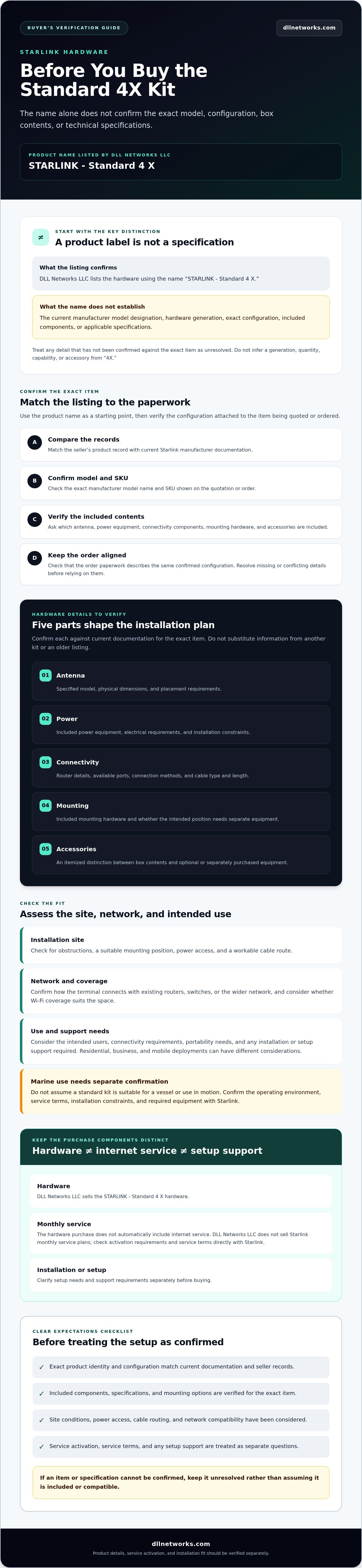
The starlink standard 4x kit is a Starlink hardware product that DLL Networks LLC lists as STARLINK - Standard 4 X. That listing confirms the product name used by DLL Networks LLC. By itself, it does not establish the manufacturer’s current model designation, hardware generation, box contents, or technical specifications.
Starlink is a satellite internet system. For background on the broader service and its technology, see this overview of Starlink satellite internet. A general description of Starlink cannot confirm the configuration of a specific kit, however. Check current manufacturer documentation and seller records before treating any component or capability as included.
How to confirm what “Standard 4X” identifies
Use the product name as a starting point, not as a specification. Labels may not distinguish every configuration, so confirm the details tied to the exact item being quoted or ordered. Ask the seller to match its listing to current manufacturer documentation, then check that the order paperwork reflects the same configuration.
- Match the listing: Compare the seller’s product record with current Starlink documentation.
- Confirm the designation: Ask for the exact manufacturer model name and SKU shown on the quotation or order.
- Verify the contents: Request confirmation of the antenna, power equipment, connectivity components, mounting hardware, and accessories included.
- Check unresolved specifications: Confirm compatibility and mounting options from authoritative documentation rather than inferring them from “4X.”
Don’t infer a hardware generation, quantity, or included accessory from the label alone. If the exact SKU or contents can’t be confirmed, treat those details as unresolved before purchase.
Who should evaluate this Starlink kit
Start with the intended site, expected users, and connectivity requirements. A residential installation, a business network, and a mobile deployment can involve different placement, integration, and service considerations. Note how the connection will be used and what other network equipment needs to work with it, then check the proposed setup against official documentation.
Marine use needs a separate review. Don’t assume a standard hardware kit is suitable for a vessel or use in motion. Confirm the intended operating environment, service terms, installation constraints, and required equipment with Starlink before ordering. The hardware purchase is separate from service activation, so verify activation requirements and terms directly with Starlink.
Which Starlink Standard 4X Hardware Details Should You Verify?
Don’t build an installation plan around an unverified component list. For the starlink standard 4x kit, check current manufacturer documentation and the seller’s confirmed records. The available product name alone doesn’t establish what hardware is included or which specifications apply.
Use the Starlink Standard 4X specifications as a reference, then confirm that the configuration described matches the exact item being quoted. Note missing or conflicting details as unresolved. Don’t fill gaps using information for another kit or an older listing.
Confirm the kit contents and physical interfaces
Review these five areas before ordering. Ask for documentation or seller confirmation for each, including exact values wherever they affect installation or network design:
- Antenna: Confirm the specified model, physical dimensions, and placement requirements.
- Power: Check which power equipment is included, its electrical requirements, and any installation constraints.
- Connectivity: Verify router details, available ports, connection methods, and cable type and length.
- Mounting: Confirm which mounting hardware is included and whether the intended position requires separate equipment.
- Accessories: Request an itemized list that distinguishes box contents from optional or separately purchased equipment.
These details shape the installation layout. Cable length, for example, can limit equipment placement. Port and router information can determine how the terminal connects to an existing router, switch, or wider network. Confirm compatibility before finalizing cable routes or network plans. If a specification isn’t in current documentation or confirmed seller records, treat it as unknown.
Check site and network compatibility
Confirm Starlink’s current guidance for sky visibility and obstructions, then assess the proposed antenna position against it. Review mounting and environmental requirements for the actual location as well. Don’t assume a mount, cable route, or exposure condition is suitable without checking the manufacturer’s instructions.
Map the connection path before setup: terminal to router, then router to any existing network equipment or Wi-Fi system. Verify the required interfaces and whether additional equipment is needed. If the confirmed ports or cables don’t match your network design, adjust the planned layout before installation.
If you’re comparing confirmed kit details with your site and network plan, discussing equipment fit and setup needs with DLL Networks LLC can help clarify what to verify before installation.
Is the Starlink Standard 4X Kit the Right Fit for Your Setup?
Choose hardware based on the deployment, not the name alone. Start with where the terminal will be installed, who will use the connection, how it must connect to your network, and what support the setup may need. Evaluate the starlink standard 4x kit against those requirements using confirmed specifications, not assumptions about speed, coverage, or durability.
The FCC’s authorization for Starlink’s network concerns the satellite system, not the fit or configuration of a particular kit. It doesn’t confirm equipment compatibility, service availability at your site, or what comes in the box.
Compare kit categories against your requirements
DLL Networks lists the STARLINK - Standard 4 X, STARLINK - Mini Kit, STARLINK - Performance Kit, and STARLINK - Standard V5 Kit. These product names identify available categories, but they don’t establish comparative specifications. Compare current manufacturer documentation and seller records for the exact details that matter to your deployment before choosing.
- Fixed residential site: Verify the intended installation environment, mounting options, and network interfaces for each candidate.
- Portable or changing locations: Confirm whether the specific kit and service terms support your intended use. Don’t infer portability from a product name.
- Business network: Check router and port details, integration requirements, and the support needed for your network design.
- Specialized installation: Confirm environmental guidance, mounting compatibility, and installation requirements for the site.
If model-specific evidence is unavailable or records conflict, keep the question open. Don’t assume one option is faster, more durable, or better covered than another. A broader kit-comparison article can help organize your selection, but confirm final specifications against current documentation before ordering.
Does the kit include Starlink internet service?
A hardware purchase does not establish that a service plan is included. DLL Networks sells Starlink equipment, but not Starlink monthly internet service plans. Don’t assume a plan comes with the kit.
Before purchasing hardware, check directly with Starlink whether service is available for your intended location, what activation requires, and which service terms apply to your use. Treat these as separate decisions: confirm the kit configuration with the seller, then confirm service and activation with Starlink. This keeps hardware selection, network planning, and connectivity expectations aligned.
What Should You Check Before Buying or Installing the Starlink Standard 4X?
A short pre-installation review can catch product mismatches and site constraints before equipment is ordered. Work through the checks in sequence, keeping the starlink standard 4x kit product identity, installation plan, and network requirements tied to confirmed documentation.
Assess the location and installation requirements
Use current Starlink tools and documentation to assess obstructions at the proposed installation point. Then record the physical and electrical details that will shape the installation:
- Product identity: Match the seller listing to current manufacturer documentation. Confirm the exact model designation and SKU on the quotation or order.
- Sky view: Check the proposed position for obstructions using Starlink’s current guidance. If the location is constrained, assess another mounting position before committing.
- Mounting surface: Note where the hardware will be secured and verify that the mounting option is compatible with the exact kit. Don’t assume a mount is included.
- Power access: Identify a suitable power location and confirm the kit’s requirements from current documentation.
- Cable route: Plan the route from the antenna to indoor equipment. Check distance, entry points, and building constraints against confirmed cable details.
- Equipment location: Choose an indoor position that supports the planned network layout and Wi-Fi coverage.
For installation steps, rely on Starlink’s current instructions and mounting resources for the verified kit. If the work involves challenging mounting conditions, building penetrations, or complex network configuration, consider qualified installation support. Confirm the scope and suitability for your site before proceeding.
Plan the local network and support needs
Before selecting additional Wi-Fi equipment, identify where coverage is needed and which devices must connect. Check for dead zones, locate wired devices, and map the connection from the Starlink hardware to your existing router or network. Confirm interfaces and compatibility from documentation for the exact equipment, not from a similar model’s specifications.
Use this final readiness check:
- Have the product name, SKU, and included components been confirmed?
- Is the proposed location clear of obstructions according to current guidance?
- Are mounting, power, and cable-routing requirements understood?
- Does the planned network meet household or business device and Wi-Fi needs?
- Have service availability and activation requirements been checked directly with Starlink?
DLL Networks offers network installation and setup services. After completing these checks, contact DLL Networks to discuss your hardware and setup requirements.
How to Purchase the Starlink Standard 4X Kit with Clear Expectations
A clear purchase starts with details confirmed in writing. DLL Networks lists the product as STARLINK - Standard 4 X. That confirms the seller’s product name, but the exact manufacturer designation, SKU, current box contents, and specifications still need confirmation for the item being quoted. Don’t treat “4X” alone as proof of a particular generation or configuration.
Keep three decisions separate: which hardware you’re ordering, whether Starlink service is available and can be activated for your intended use, and whether installation or network setup support is needed. This avoids assuming that an equipment purchase includes service or a particular installation arrangement.
Questions to resolve before placing an order
- Product identity: Ask for the exact product designation and SKU, and have them recorded on the quotation or order.
- Kit contents: Request a current, itemized list of included hardware. Confirm which accessories or mounting components, if any, must be purchased separately.
- Technical fit: Check documented interfaces and requirements against your planned location and network. Treat unavailable or inconsistent information as unresolved.
- Service: Verify service eligibility, activation steps, and applicable terms directly with Starlink. DLL Networks does not sell Starlink monthly internet service plans, and the hardware listing does not establish that service is included.
These checks give you a specific configuration to compare with your installation plan. If the quotation and manufacturer documentation don’t match, ask for clarification before placing the order rather than relying on an assumed interpretation of the product name.
When to ask DLL Networks about setup
Contact DLL Networks when you need to review equipment fit or how the hardware will connect with your existing network. Share the intended site, current network equipment, expected use, and any known mounting or cable-routing constraints. Those details make the discussion more practical and help identify what still needs verification.
Hardware sales and installation or setup support are separate considerations. Ask what installation or network setup would involve for your project, and confirm scope and availability before relying on support as part of your plan.
DLL Networks lists the STARLINK - Standard 4 X for buyers evaluating Starlink hardware. Review the product details with DLL Networks, confirm the configuration and any open questions, then verify service activation directly with Starlink. That gives you a sound basis for deciding whether the starlink standard 4x kit fits your requirements.
Make Your Hardware Decision with Confidence
A sound purchase starts with verified details, not assumptions about the “4X” label. Confirm the product designation, current kit contents, and specifications against reliable documentation before ordering. Then check that the installation site, mounting plan, power access, cable route, and network layout suit the confirmed equipment.
The starlink standard 4x kit is hardware, not a Starlink monthly internet service plan. Check service eligibility and activation requirements directly with Starlink. Keep that decision separate from equipment selection and any installation or Wi-Fi setup needs.
DLL Networks lists STARLINK - Standard 4 X hardware and also offers network installation and setup services, along with complementary Wi-Fi networking hardware. Discussing your site and network requirements can help clarify what to verify for your project. Review the Starlink Standard 4 X hardware and discuss your setup requirements. With the right details confirmed, you can move forward with a clearer plan.
Frequently Asked Questions
What is the Starlink Standard 4X Kit?
DLL Networks lists the product as STARLINK - Standard 4 X, a Starlink hardware kit. That listing confirms the seller’s product name, but it doesn’t independently verify the manufacturer’s current model designation, hardware generation, or technical configuration. The phrase “4X” alone isn’t enough to identify those details. Before ordering, match the seller’s listing to current Starlink documentation and confirm the exact model identifier on your quotation.
What comes in the Starlink Standard 4X Kit?
Confirm the exact contents in current manufacturer documentation for the specific kit being purchased. Don’t assume the antenna, router, power equipment, cables, mount, or other accessories are included based on the product name or an older listing. Compare the documentation with the seller’s itemized records, and ask which required components are sold separately. This helps identify gaps before you plan the installation or network layout.
Does the Starlink Standard 4X Kit include an internet service plan?
No. Purchasing hardware from DLL Networks doesn’t establish that a Starlink monthly internet service plan is included. DLL Networks sells Starlink equipment, not monthly Starlink service plans. Check service availability, activation steps, and applicable terms directly with Starlink. Treat the equipment order and service activation as separate decisions, and confirm both before relying on the kit for a particular site or use.
Is the Starlink Standard 4X Kit the same as the Starlink Standard V5 Kit?
Don’t assume they’re the same. DLL Networks lists STARLINK - Standard 4 X and STARLINK - Standard V5 Kit as separate product names, but those listings alone don’t establish how their hardware or specifications compare. Check the precise model identifiers, current manufacturer documentation, and confirmed kit contents for each option. If identifiers or records don’t align, ask the seller to clarify the configuration before ordering.
Can the Starlink Standard 4X Kit work with my existing Wi-Fi router?
It depends on the confirmed interfaces and your network configuration. Check the kit’s current documentation for connection options, ports, and router details, then compare them with your existing equipment. Consider how the Starlink hardware will connect to the router and whether your planned layout requires additional components. DLL Networks also sells Wi-Fi networking hardware, but confirm compatibility for your specific equipment rather than assuming a connection will work.
What should I check before installing a Starlink Standard 4X Kit?
Review current Starlink installation guidance and assess the proposed location for obstructions. Confirm a suitable mounting position, power access, and a cable route to the planned indoor equipment location. Verify mounting requirements for the exact kit instead of assuming a mount is included or compatible. Also consider how the router will connect to your network and where Wi-Fi coverage is needed. Resolve unclear specifications before installation.
Can DLL Networks help with Starlink installation and network setup?
DLL Networks offers network installation and setup services, in addition to selling Starlink and Wi-Fi networking hardware. For a useful project discussion, describe the installation site, existing network equipment, intended use, and any mounting or cable-routing constraints. Ask what the work would include and confirm project-specific scope and availability before relying on installation support. Starlink service activation is separate, so direct plan and activation questions to Starlink.
