
A dish in the wrong location can undermine an otherwise capable internet setup. A starlink setup service can help with equipment placement and network configuration, but the exact work included varies by installer. Before booking, get clear answers about where the dish can go, how it will be mounted, and whether the Wi-Fi network can serve the spaces that need a connection.
A complete setup involves more than attaching hardware. The site, Starlink equipment, mounting approach, and indoor network all need to be considered together. The dish needs a suitable view of the sky, while the Wi-Fi setup depends on how people will use the connection at home, at work, or aboard a vessel.
This guide explains what professional installation may cover and what to confirm before booking. It covers site checks, mounting, equipment responsibilities, network setup, and how to prepare for an appointment. DLL Networks LLC offers Starlink equipment, installation, and network setup for residential, commercial, and marine deployments. Its AX Tri Band Wi-Fi system is also available as a networking option.
Key Takeaways
- A starlink setup service may cover equipment installation and network setup. It does not include purchasing a Starlink internet plan.
- Before booking, ask which tasks are included, how site conditions will be assessed, what testing will be done, and what support follows handoff.
- Choose between DIY and professional installation based on the site, the work involved, and your confidence handling equipment and network configuration.
- Prepare a list of users, coverage areas, existing routers, and any special connectivity requirements so the installer can understand the project.
- Ask how the proposed equipment fits your deployment, and confirm the service scope before selecting a kit or scheduling installation.
When a Starlink Setup Service Makes Sense for Your Installation
Starlink equipment setup and internet service are separate. DLL Networks LLC sells Starlink hardware and offers professional installation and network setup. It does not sell Starlink monthly internet plans, so you’ll need to arrange a plan separately. For background on the network and its technology, see this overview of Starlink satellite internet.
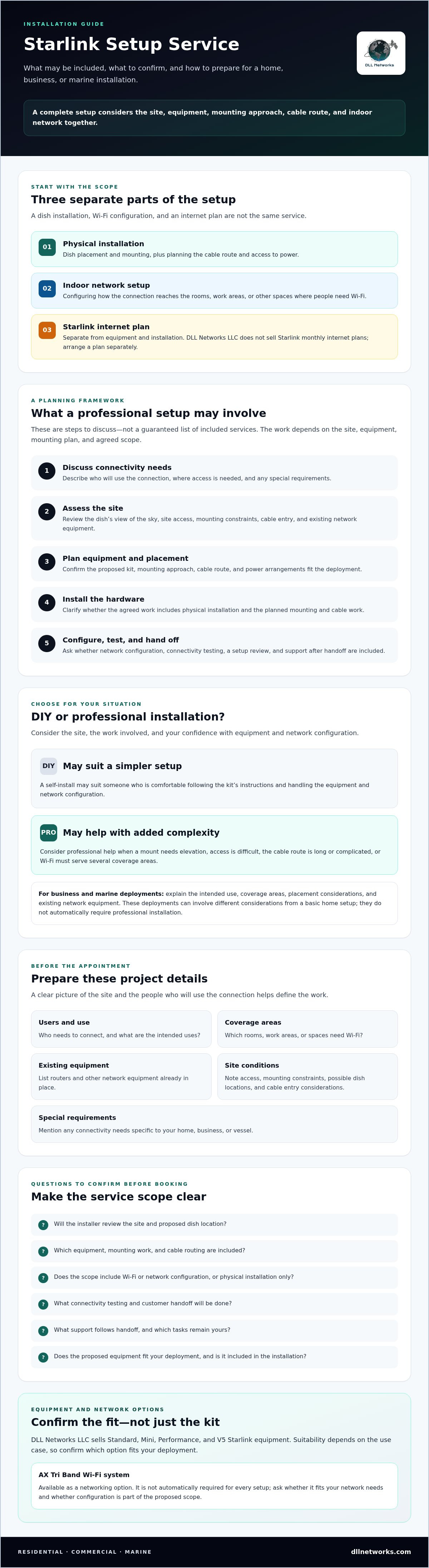
A Starlink setup service is professional assistance with installing Starlink equipment and configuring a network for a particular deployment. The work varies, so confirm the scope before booking. Ask whether the service includes a site review, equipment installation, initial configuration, and connectivity testing. These are items to clarify, not automatic inclusions.
Keep the main parts of the project distinct. Physical installation covers the dish, its mounting, and the cable route. Wi-Fi setup determines how the connection is distributed across the areas where people use it. Neither task is the same as providing ongoing Starlink internet service. DLL Networks LLC also sells AX Tri Band Wi-Fi equipment, but confirm whether the equipment and its configuration are part of the proposed installation.
What a Starlink setup service can cover
Before scheduling, request a clear description of the planned work and any tasks that remain yours. A straightforward home installation may involve fewer mounting and network decisions than a site with several coverage areas, existing routers, or specialized connectivity requirements. Ask what the installer will configure, which equipment is included, how testing will be handled, and what the handoff covers.
When professional installation may be appropriate
Professional help may be useful when the dish needs an elevated mount, access is difficult, or the cable route is long or complicated. Wi-Fi requirements can also add planning. The installer may need to know where people connect, what network equipment is already in place, and which spaces need coverage. A simpler setup may suit someone who is comfortable following the kit’s self-installation instructions.
Commercial and marine deployments can involve different placement and network considerations from a basic home setup. A business may need to account for multiple user areas or existing network equipment. On a vessel, the installation context and intended use can affect equipment placement and configuration. These factors don’t mean every business or boat requires professional installation. They do make it useful to explain your requirements and confirm the service scope in advance.
What Happens During a Professional Starlink Setup
A professional setup may follow a sequence: discuss connectivity needs, assess the site, plan equipment placement, install the hardware, configure the network, test the connection, and review the setup with the customer. Treat this as a planning framework, not a guaranteed list of inclusions. Confirm which steps the installer will perform because the process depends on the location, selected equipment, mounting plan, and agreed scope.
The Starlink terminal connects to the satellite network. Wi-Fi configuration distributes that connection to devices across a home, business, or vessel. Installing a dish alone may not address coverage in every room or work area. Describe where people need access and ask whether network setup is included. DLL Networks LLC offers Starlink installation and network setup for residential, commercial, and marine deployments. Confirm the specific tasks for your project.
Site assessment and equipment planning
Start by explaining the intended coverage areas, mounting constraints, site access, and any existing routers or network equipment. Ask whether the proposed dish location has a suitable view of the sky and where cabling can enter the building. If the installation is on a property with rules or restrictions, review the FCC rules for satellite installation and confirm what applies to your situation.
Ask whether the selected kit fits the deployment requirements. DLL Networks LLC sells Standard, Mini, Performance, and V5 Starlink equipment. Suitability depends on the use case, so confirm the fit rather than assuming a particular kit is right for every installation.
Installation, Wi-Fi configuration, and handoff
Before work begins, agree on the mounting approach, cable route, and power arrangements. Clarify whether the proposed scope covers physical installation only or also network configuration. DLL Networks LLC sells an AX Tri Band Wi-Fi system as an equipment option. It isn’t automatically required for every setup, so ask whether it fits your network needs and whether configuration is included.
Close the scope discussion with specific questions. What connectivity test will be performed? Will the installer explain the equipment and network setup? Is any follow-up support included, and under what terms? The answers define what a successful handoff means for your project. For a project-specific discussion of equipment and setup needs, review DLL Networks LLC’s Starlink equipment and installation options.
DIY Setup vs. a Starlink Setup Service: Compare Scope and Risk
Choosing equipment and arranging installation are separate decisions. You can purchase a Starlink kit and handle setup yourself, or arrange professional installation and network setup. Neither option guarantees a particular speed or coverage level. The right fit depends on site complexity, the work involved, and your confidence handling equipment and configuration.
Compare the likely responsibilities before deciding:
- Installation: With a self-managed setup, you handle placement, mounting, and cable routing. With a professional, confirm exactly which physical tasks are included.
- Configuration: DIY setup means following the instructions for your kit and configuring the network yourself. Ask whether professional service includes router or Wi-Fi configuration.
- Time and access: A simple, accessible installation may be manageable on your own. Difficult mounting access or a complicated cable route can require more planning and effort.
- Troubleshooting: With DIY, you’ll need to identify and address setup issues. For a professional installation, clarify what testing and post-installation support are part of the agreed scope.
A starlink setup service can shift defined installation and configuration tasks to an installer, but responsibilities vary. Get the scope in writing so you know which tasks you’re handling and which the provider will do.
When a self-managed setup may fit
A self-managed setup may suit a straightforward project where the equipment can be placed accessibly, the mounting approach is simple, and network requirements are limited. Conditions at the site still matter. Follow the current manufacturer instructions for your exact kit, and consider whether you can safely handle placement, mounting, cable routing, power arrangements, and initial configuration. If any part exceeds your access or technical confidence, pause and ask for guidance.
When to consider professional support
Professional help may be worth considering for difficult mounting access, long or complicated cable routes, commercial network requirements, or integrating connectivity aboard a vessel. The work can involve more than positioning the terminal. Confirm who handles mounting, cabling, router configuration, connection testing, and customer orientation. For organizations evaluating service needs, consult Starlink’s business information alongside your network requirements.
DLL Networks LLC offers Starlink equipment, installation, and network setup for residential, commercial, and marine deployments. Ask which tasks are included for your project. Professional installation doesn’t promise improved performance or coverage. To review what may suit your installation, discuss Starlink setup options with DLL Networks LLC.
How to Prepare for a Starlink Installation Appointment
A productive installation starts with clear site and network information. Before scheduling a starlink setup service, document who needs connectivity, which areas need coverage, what equipment is already in place, and any access or power constraints. This gives the installer a practical picture of the project and helps focus the discussion on the decisions that still need to be made.
Information to share before the installer arrives
Describe the property, business, or vessel and how the connection will be used. A home may need coverage in particular rooms, while a business may have separate work areas or existing network infrastructure. For a vessel, explain the installation context and intended network use. Be specific about the areas where people need access, especially spaces where connectivity matters most.
Share relevant equipment and constraints in advance:
- Existing routers, mesh equipment, and other network hardware.
- Network limitations or special connectivity requirements.
- Known mounting restrictions or access considerations.
- The Starlink kit selected, and who will supply each hardware component.
- Available power arrangements near the planned equipment location.
Confirm whether the installer needs access to particular areas and whether you need to arrange access beforehand. Ask about any scheduling or site-preparation requirements specific to DLL Networks, since these may depend on the deployment.
Questions to ask about scope and completion
Before confirming the appointment, make sure you and the installer share the same understanding of the work. Ask which installation and network configuration tasks are included, how connectivity will be tested, and whether the handoff includes a walkthrough. Also clarify what happens if site conditions differ from the information you provided or the network needs extend beyond the original scope.
Ask what documentation, troubleshooting guidance, or follow-up support is available after installation. DLL Networks offers Starlink installation and network setup for residential, commercial, and marine deployments. Confirm the exact process and inclusions for your project directly.
Pre-install checklist: Document users and coverage areas, list existing network equipment and special requirements, confirm the selected kit and equipment responsibilities, review access and power arrangements, and agree on installation, configuration, testing, and handoff scope.
For help discussing equipment and installation requirements, contact DLL Networks about Starlink setup.
Choosing a Starlink Setup Service for Your Home, Business, or Boat
The right installer should explain how the proposed equipment and setup fit your deployment, rather than treating every site as the same project. Evaluate providers on four points: clarity of scope, experience with your type of installation, knowledge of Starlink equipment and Wi-Fi, and a clear handoff. A starlink setup service should spell out what it will do and what remains your responsibility.
Ask whether the provider handles residential, commercial, or marine deployments like yours, and whether it can assess your project before you proceed. A home installation, a business network, and a vessel setup can have different placement and connectivity needs. Ask how the provider will account for your requirements instead of assuming experience in one setting automatically applies to another.
Match service experience to the deployment
Equipment and Wi-Fi are related, but they are separate parts of the system. Ask how the provider will determine whether your network equipment meets your needs and whether Wi-Fi configuration is included in the proposed work. For a commercial deployment, you can also review Starlink’s business information as you define network and service requirements. Confirm the details of your project directly with the installer rather than inferring them from general marketing language.
Confirm the equipment and service handoff
Starlink Standard, Mini, Performance, and V5 kits may suit different deployments, but the right choice depends on your requirements. Ask the provider to confirm the exact kit under consideration and how it fits the site, intended use, and network plan. Also verify the mounting approach, any additional network equipment, and which components you or the installer will supply.
Before agreeing to the work, ask how connectivity will be checked and what the final handoff includes. Will someone explain the completed setup and show you how to access the network? Is documentation or follow-up support included? Get clear answers and a defined scope instead of assuming these steps are standard.
DLL Networks sells Starlink Standard, Mini, Performance, and V5 equipment, along with AX Tri Band Wi-Fi equipment, and offers installation and network setup for residential, commercial, and marine deployments. It sells hardware and setup services, not Starlink monthly internet plans. Confirm the equipment fit and project scope directly. Contact DLL Networks about Starlink equipment and setup.
Plan a Setup That Fits Your Site
A useful connection plan reflects the installation location and how people will use the network. Before booking, clarify the equipment, mounting and installation responsibilities, Wi-Fi configuration, testing, and handoff. A starlink setup service can help coordinate these parts, but inclusions vary, so agree on the scope directly with the installer.
DIY may suit a straightforward installation and a confident customer. More complex mounting, network needs, or residential, commercial, and marine requirements may call for professional support. Equipment selection is part of the decision, but it doesn’t replace confirming the installation plan.
DLL Networks sells Starlink Standard, Mini, Performance, and V5 kits and offers installation and network setup for residential, commercial, and marine deployments. Starlink monthly internet plans are arranged separately. To discuss equipment and setup requirements for your project, contact DLL Networks about Starlink equipment and setup. A clear scope is a practical first step toward an installation planned around your needs.
Frequently Asked Questions
What does a Starlink setup service include?
A starlink setup service may include site assessment, equipment installation, network configuration, connectivity testing, and a customer handoff. The exact scope varies by installer and site, so confirm each task before booking. Ask whether mounting and cable work are included, whether Wi-Fi setup is part of the service, and what testing or follow-up support is provided. Equipment installation, Wi-Fi configuration, and monthly internet service are separate components.
Do I need a professional to set up Starlink?
No. A straightforward installation may be manageable as a DIY project if the equipment location is accessible and your network needs are limited. Follow the current instructions for your specific kit and consider whether you can safely handle placement, mounting, cabling, and setup. Professional support may be useful for difficult access, complex mounting, long cable routes, or network requirements you’re unsure how to configure. The choice depends on the site and your confidence.
Can a Starlink installer configure my home Wi-Fi too?
Some installers offer network setup, but don’t assume Wi-Fi configuration is included with dish installation. Ask whether the work covers router setup, integration with existing network equipment, or coverage across the areas you use. DLL Networks offers installation and network setup, and sells an AX Tri Band Wi-Fi system. Confirm whether Wi-Fi equipment or configuration is included in the scope for your project.
Can Starlink be professionally installed on a boat?
DLL Networks offers professional Starlink installation and network setup for marine deployments. The right equipment and installation approach depend on the vessel and intended use, so discuss the project details with the installer before selecting a kit. Confirm what mounting and configuration tasks are included, how connectivity will be tested, and whether the service process fits your vessel’s requirements. Don’t assume every kit or setup suits every marine use.
What should I prepare before a Starlink installation?
Document who needs access, which areas require coverage, and what routers or network equipment are already installed. Note any special connectivity requirements, site access constraints, mounting limitations, and available power arrangements. Confirm the selected kit and who supplies each component. Before the appointment, agree on installation, Wi-Fi configuration, testing, and handoff responsibilities. Ask the provider about any project-specific scheduling or preparation requirements rather than assuming a standard process.
Does DLL Networks sell Starlink internet service plans?
No. DLL Networks sells Starlink hardware, including Standard, Mini, Performance, and V5 kits, and offers installation and network setup for residential, commercial, and marine deployments. It does not sell Starlink monthly internet service plans. Arrange the internet plan separately through Starlink, and confirm with your installer which hardware and setup tasks are part of your project. Keeping equipment, installation, and ongoing service distinct helps clarify each provider’s responsibilities.
How do I choose a Starlink setup service for a business?
Look for a clear project scope and experience with commercial deployments. Explain the areas that need connectivity, existing routers or network equipment, and any specific requirements. Ask the provider to confirm the proposed kit, mounting and cabling responsibilities, Wi-Fi configuration, connection testing, and customer handoff. DLL Networks sells Starlink equipment and offers commercial installation and network setup. Confirm the exact inclusions for your site before proceeding.

